Integration
Alongside your ERP,not instead of it.
PlanifAI does not replace your ERP, your CMMS or your HR software: it reads what it needs from them and sends the plan back. Your systems remain the official record.
Your ERP knows what has to be done. PlanifAI decides when and where
Its MRP computes requirements assuming infinite capacity. PlanifAI brings in real capacity and your rules.
Your ERP keeps doing
- Orders, customers, materials and stock.
- Bills of materials, routings and work centres.
- MRP: what to make or buy and by when, assuming infinite capacity.
- Production and work orders, and their closure.
PlanifAI adds
- The sequence with the real capacity of each machine, workshop or person.
- Your process, maintenance or labour rules, including the unwritten ones.
- Alternatives compared with their impact and cost before deciding.
- Replanning after an incident without redoing everything, with a history of who decided what.
If you already use a finite-capacity scheduler (for example, your ERP’s detailed scheduling module) and it covers all your rules, you probably do not need PlanifAI. We will tell you in the first conversation.
Also with your CMMS, your MES and HR
ERP
SAP, Oracle, Dynamics, Infor or others. Orders, routings, resources and calendars come in; sequence and dates go back.
Maintenance system
CMMS or MRO. Assets, hours, programme and open orders come in; date and workshop of each service go back.
HR and time tracking
Staff, skills and absences come in; the roster with covers goes back.
MES and shop floor
Progress of orders in work, so that what has started does not move.
What data goes and comes back
The minimum to start, per case. In the project we adjust it to what your system already holds.
| Production | Maintenance | Shifts | Forecasting | |
|---|---|---|---|---|
| Master data | Plants, resources and capacities, routings with times, calendars | Assets, service types and intervals, workshops and capacity | People, contracts and working hours, skills, posts | Items, families and units |
| In progress | Orders with date and priority, running orders, available material | Accumulated hours or cycles, open orders, groundings | Approved absences, holidays, needs per shift | Sales or consumption per month, stock and lead times |
| Rules | Same plant, precedences, waits, windows | Minimum availability, cap per workshop, grouping | Rest, consecutive days, weekends | Horizon, scenarios and external variables |
| What goes back | Sequence and dates per plant and stage, affected orders | Date and workshop of each service, expected availability | Roster and confirmed covers | Reorder point and safety stock per item, forecast with its range and items at risk of stock-out |
Four routes, from a spreadsheet to the API
Excel or CSV, with review
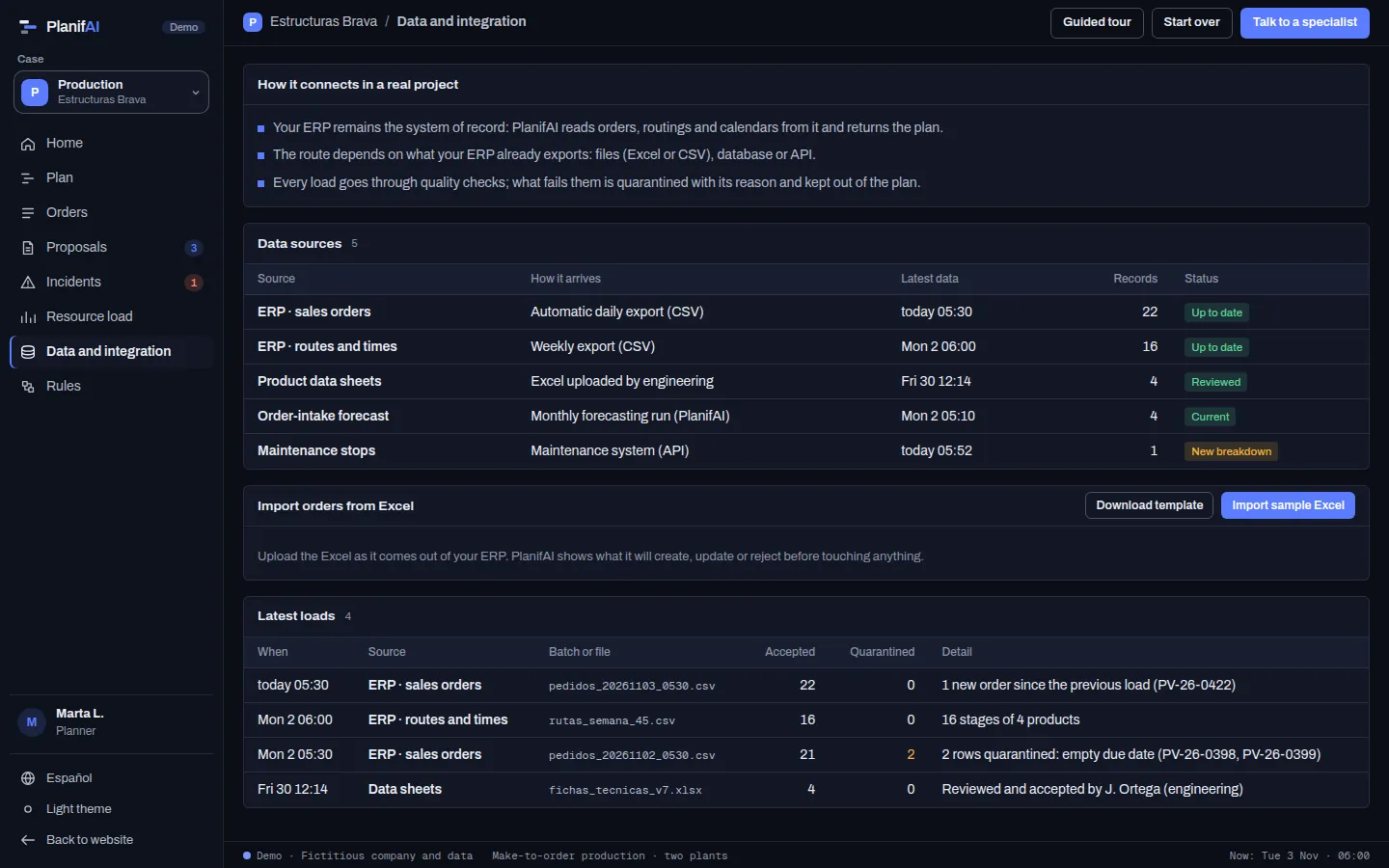
You load the sheets your team already uses. PlanifAI flags errors and gaps and you review the changes row by row before anything is created. It is how a pilot starts and, sometimes, how you operate.
Ingestion from your system
Incremental and scheduled, with quality checks: incomplete, duplicate or out-of-range rows go to quarantine and you see the date of the latest data from each source.
API
REST API and asynchronous jobs: you launch a computation as a job and collect the result when it finishes, so you can orchestrate it from your middleware.
Plan export
You download the plan as CSV or we leave it in a staging table for your system to pick up.
With SAP specifically
The usual routes are scheduled exports, staging tables, IDocs, BAPIs or OData on S/4HANA. Which one, how often and whether the plan goes back automatically or after the planner confirms it is decided in the project, with your IT team.
We do not sell packaged connectors or certified integrations. Each integration is built around what your system already exports, and we build it.
From spreadsheets to automatic integration, in five steps
- 1
Start with Excel
The pilot runs on exports or the sheets you already have. There is no need to touch the ERP to find out whether PlanifAI fits.
- 2
Agree the exchange
With your IT team: which data, from which tables or messages, how often and who owns each one.
- 3
Automate the input
Scheduled ingestion with quality checks and quarantine. Master data in batches; incidents as they happen.
- 4
Return the plan
By file, API or staging table. It can go back automatically or wait for the planner to confirm it.
- 5
Operate
Date of the latest data per source, a load log and alerts when something does not arrive or does not add up.
Questions
Does PlanifAI store my orders and stock?
It stores what it needs to plan and the plans with their versions. The official record of orders, stock and work orders stays in your ERP.
Does it write directly into SAP?
It can, if agreed in the project (for example, through a BAPI or a staging table your system picks up). Usually a person confirms the plan before it goes back to the ERP.
Is it real time?
The frequency is agreed: master data usually goes in batches and incidents as they happen. What matters is that you always see how recent the latest data is.
What if the data comes in wrong?
Rows that fail the checks go to quarantine with the reason, and the plan is computed on the last good data. Nothing is imported blindly.
Who does the integration?
We do, with your IT team. What we need from you is access to the data and someone who knows your ERP.
What if I do not have an ERP yet?
We work with Excel. It is the same route as in a pilot, with review before import.
Shall we talk to your IT team? We will explain how it would fit with your ERP.
A call with your IT team to see what your ERP exports and how the plan would go back.