Forecasting

How much you will needuntil your next delivery arrives.

PlanifAI forecasts how much of each item you will sell or use until the next order arrives and sends your ERP the reorder point and safety stock for the risk you choose. Your ERP keeps placing the orders.
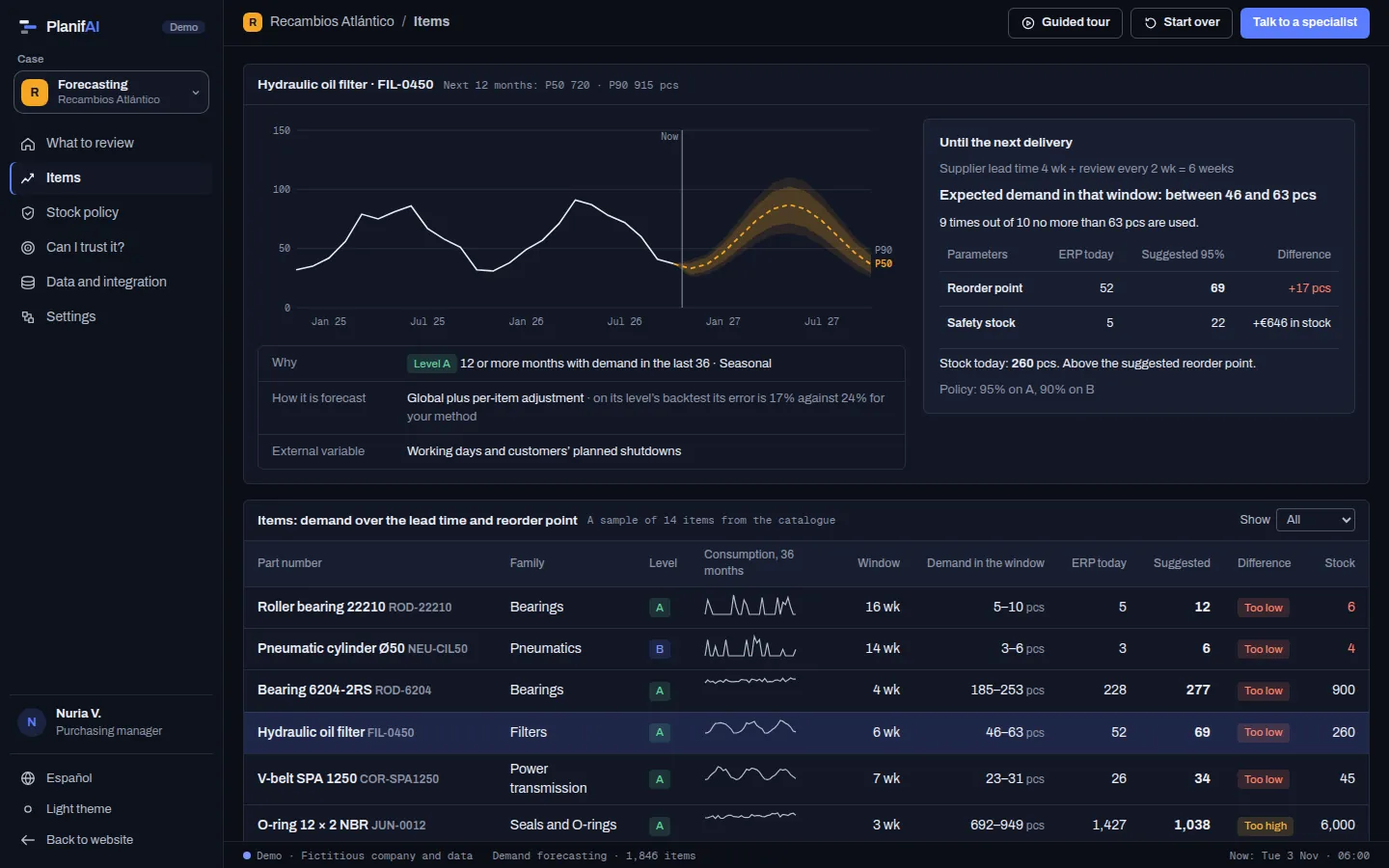
PlanifAI demo: seasonal history of a filter, 12-month forecast with its bands and suggested reorder point against the ERP one
Demo screenshot · fictitious company and data

Forecasting

For each item, the model that predicts it best

Several models predict your history as if they had never seen it. The one with the smallest error on cumulative demand wins, because that is what matters for replenishment.

Example data
TestForecast0105210

Error on cumulative demand

  1. Same month last year17.4 unitsWins
  2. Trend and seasonality29.0 units
  3. 12-month averageyour usual method80.1 units
  4. Intermittent demand (Croston)157.8 units

ActualP50 · P80–P90 band

Three fictitious items from a manufacturer’s warehouse and four simple models. Each one is fitted on the data up to the cut-off and measured on the next 12 months. In the product more models compete, including machine-learning ones.

One forecast, six decisions

A forecast is not one more report: it feeds a decision, and each team uses it for a different one.

  • Purchasing and supply

    Which reorder point and safety stock each item needs, to avoid stock-outs without filling the warehouse.

    Supplier lead time + how often you order

  • Make-to-stock manufacturing

    How much of each product to make and which long-lead materials to buy before the order exists.

    Manufacturing lead time and critical materials

  • Make-to-order manufacturing

    How much load will come in per family, to size shifts and buy ahead.

    One to six months

  • Fleet maintenance

    Which spare parts to hold at each base so no service is delayed by a missing part.

    Part lead time; the fiscal year, for the budget

  • Finance

    How much money sits in stock that will not move, and how much you will need to budget for purchasing next year.

    The fiscal year

  • Shift-based services

    How much workload is coming (samples, jobs, calls) and how many people each shift needs.

    Two to twelve weeks

From history to reorder point, in five steps

Purchasing does not ask “how much per month?”. It asks “will what I have last until the next order arrives?”.

  1. 1

    History and drivers

    Sales or consumption per item and, if you have them, what explains them: calendar, usage hours, planned shutdowns.

  2. 2

    Until the next delivery

    PlanifAI forecasts demand for the window that matters: supplier lead time plus how often you order, with its range.

  3. 3

    How much risk you take

    You pick a service level per item type: more on regular items, less on occasional ones, on demand for rare ones.

  4. 4

    Reorder point and safety stock

    PlanifAI computes them from the window forecast and the chosen level, and compares them with what your ERP has today.

  5. 5

    Your ERP orders

    Parameters go back to the ERP, which places orders as it does today, minimum lots and multiples included.

An example: roller bearing 22210

  1. Roller bearing 22210. Lead time is 12 weeks and you order every 4, so the window is 16 weeks.
  2. Over that window usage is typically 5 to 10 units. Only one time in ten does it go above 10.
  3. Your ERP reorders when 5 are left. For a 95% service level the reorder point is 12.
  4. There are 6 in stock plus 3 of an equivalent from another brand: 9 in total, below 12. With the new parameter, the ERP would reorder today.

Data from a fictitious demo scenario.
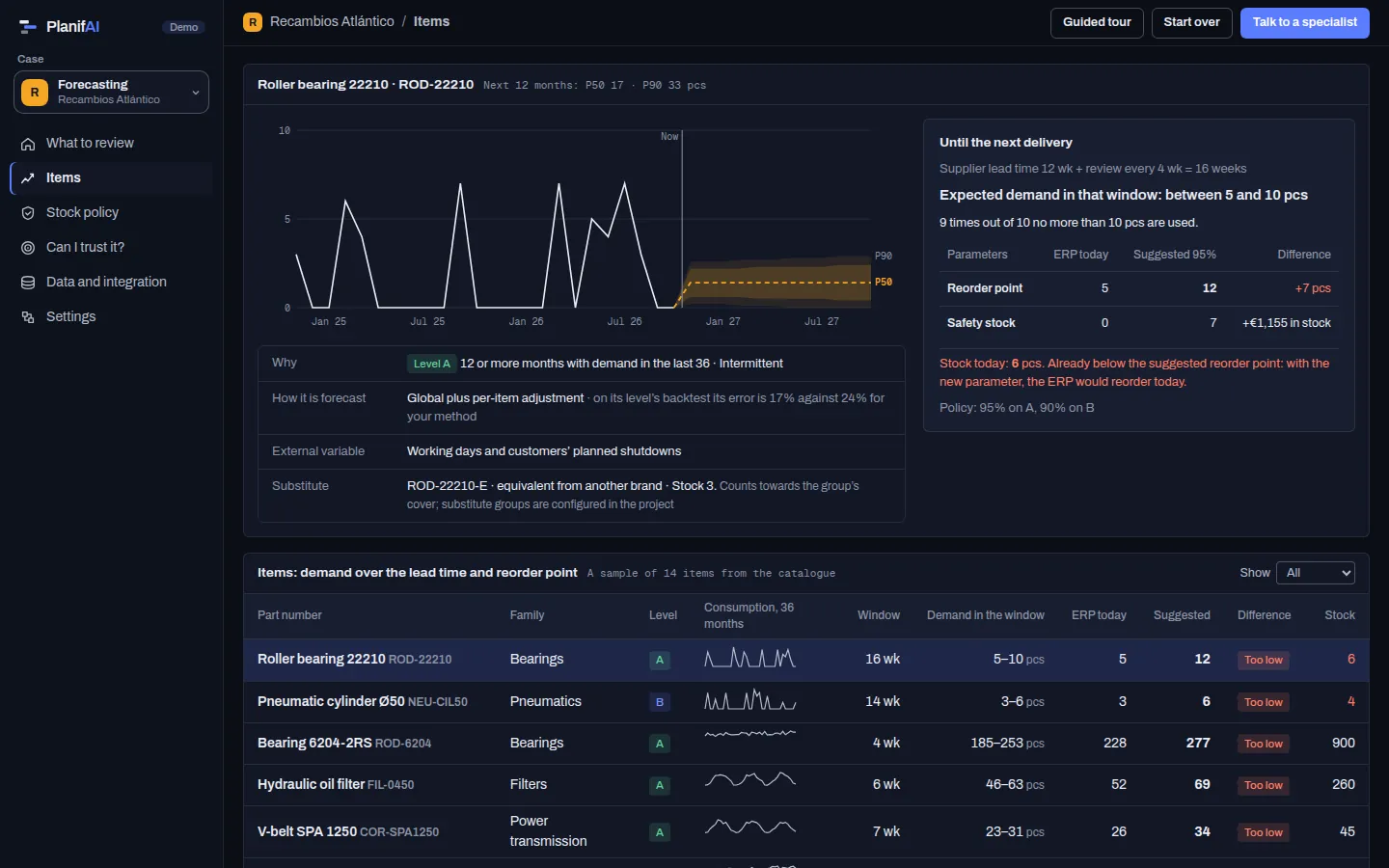
PlanifAI demo: item page with demand until the next delivery and the ERP reorder point against the suggested one
Demo screenshot · fictitious company and data

Forecasting

You choose the risk, with its price

PlanifAI does not give you a single answer: it shows you several policies with their cost and you decide.

  • Three service-level policies, each with its safety stock in euros, the stock-outs to expect per year and the total cost against what the ERP’s reorder points give today.
  • More protection where it matters most: regular and critical items, not the whole catalogue alike.
  • When you apply one, the decision is recorded and the parameters are exported for the ERP.
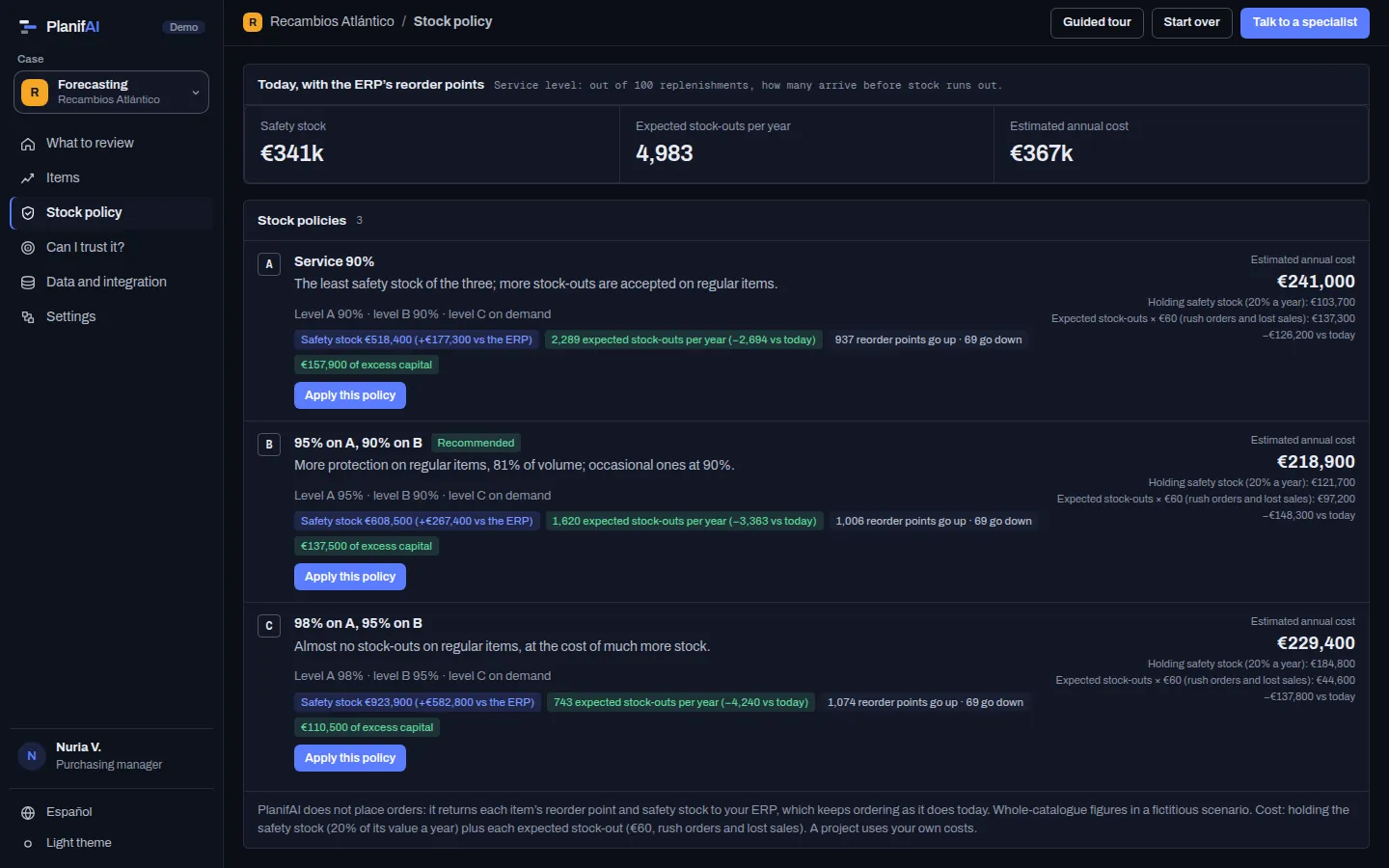
PlanifAI demo: three stock policies with their safety stock, expected stock-outs and cost
Demo screenshot · fictitious company and data

The hard cases, no small print

What a buyer asks in the first meeting and how we handle it today.

Supplier lead time and review periodThe forecast window is the lead time plus how often you order, per supplier.In the product
Variable lead timesPlanifAI uses a prudent lead time based on each supplier’s actual lead times.Configured in the project
Intermittent demandItems with sporadic demand get their own method and service level, or are ordered on demand.In the product
New itemsThey lean on similar items until they have history of their own.In the product
Discontinued itemsPlanifAI stops forecasting them from their discontinuation date.In the product
SupersessionPlanifAI merges the old item’s history into the new one.Configured in the project
Interchangeable itemsThe group’s stock counts towards cover: a stock-out only happens if the whole group runs out.Configured in the project
Minimum lots, multiples and packsYour ERP applies them when it places the order, with the reorder point PlanifAI provides.Your ERP does it
RepairablesParts that come back from repair (pool sizing) are not modelled.Not today

Can I trust it? Check it on your history

Before a single parameter changes, we measure the forecast on your data.

  • Against the method you use today (the 12-month mean, the ERP forecast or the one your purchasing team uses today), not one chosen to look good.
  • At each cut-off, the models only see earlier data and are compared with what happened afterwards.
  • The model is chosen on a validation period and assessed on cut-offs it did not see when chosen.
  • Per level and per cut-off, with a clear verdict: better, same or worse than yours.
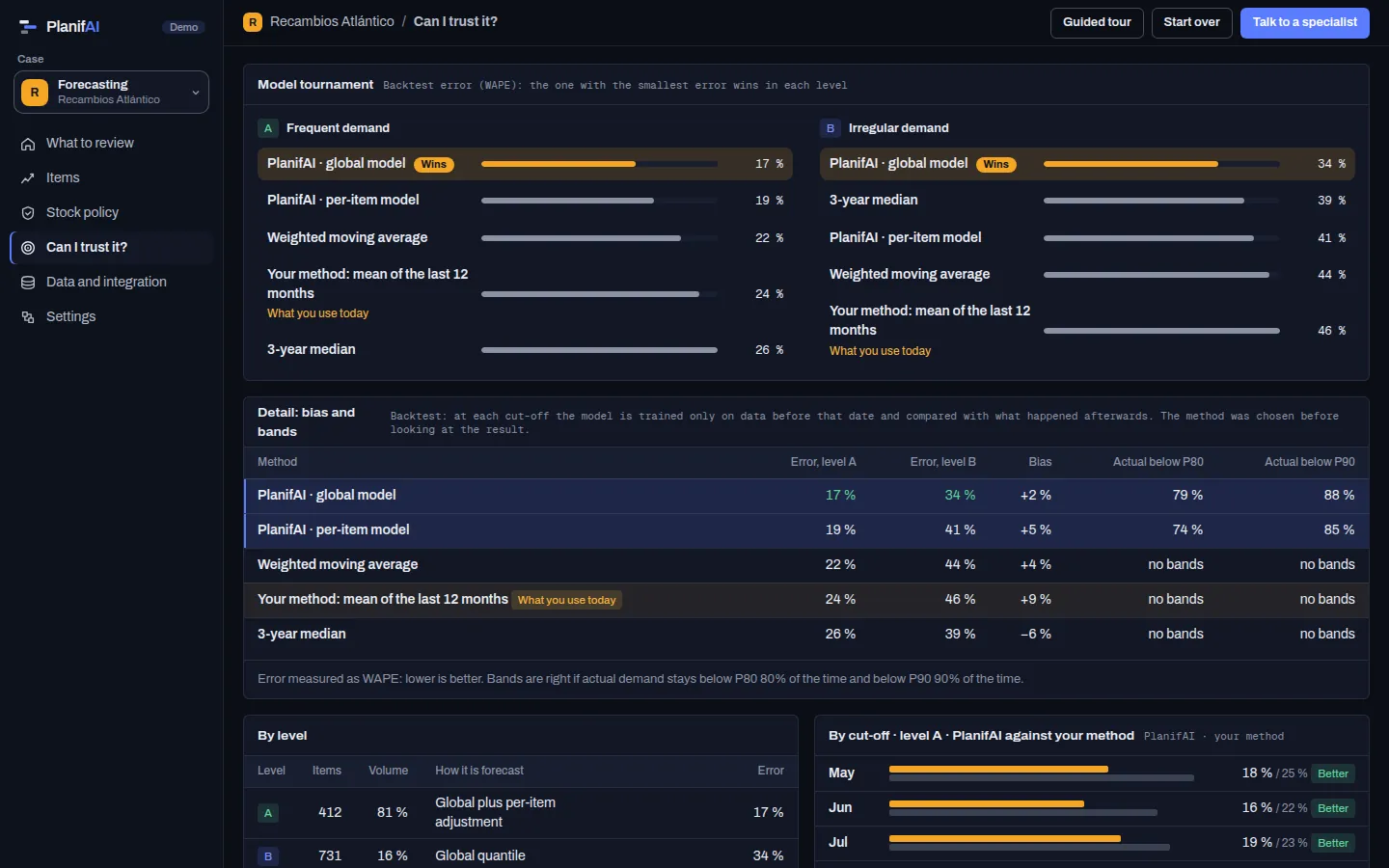
PlanifAI demo: forecast accuracy against the current method, per level and per cut-off
Demo screenshot · fictitious company and data

With planning, the full cycle

You can buy it on its own. But if you also use planning, the forecast is the first step of the cycle: forecast, plan and replan.

  • Spare parts from the maintenance plan

    Scheduled consumption comes from the services in the plan; unscheduled, from the forecast with usage hours. If a service will be missing its part, it warns you in time to order it.

    See it in the demo
  • Forecast orders in production

    Forecast demand goes in as forecast orders to check it fits in the plan before it arrives, and what would slip if not.

    See it in the demo
  • Forecast workload in shifts

    The weekly workload forecast gives the needs per shift and skill, the starting point for the roster.

Today they are separate modules: the forecast does not change the plan on its own. The link is configured in each project; the demo shows how it looks.

Your ERP keeps ordering. PlanifAI gives it the parameters

PlanifAI does not place orders or replace your MRP.

Reads

  • Sales or consumption per item and month
  • Item master and families
  • Stock, open orders and lead times per supplier
  • External variables, if any

Returns

  • Reorder point and safety stock per item
  • Forecast per item, with its range
  • Items with no movement and level changes

How it integrates with your ERP

Questions

Can I buy forecasting on its own?

Yes. It is a separate product: buy it on its own or with production, maintenance or shift planning.

My ERP already computes a safety stock. What changes?

Usually it is a fixed value or a recent average, ignoring the review period and how irregular demand is. PlanifAI computes it per item, with the risk you choose, and shows which ones fall short and which are too high.

Does it tell me how much to buy?

It gives you the reorder point and safety stock, and your ERP computes the order with its lots and multiples. Order proposals inside PlanifAI are not part of the product today.

How much history is needed?

Three years of monthly data is the usual starting point. Items with little history lean on similar ones.

Does it work if our demand is very irregular?

Yes. That is what it is built for: each item gets a level by how often it is used and a method for its demand type.

What does a forecasting pilot look like?

On your history, with no integration: we measure against your method and compute the parameters that would change, with what they cost. If you need it, we sign a confidentiality agreement first.

Send us your history. We tell you which reorder points would change.

With three years of history and no integration, we measure the forecast against your method and tell you what the new parameters would mean in stock.