Optimisation

Dates you can keep.With the real capacity of each plant.

Make-to-order or make-to-stock, in batches or continuous, in one plant or several. PlanifAI finds the best plan and the best sequence with your machines and your rules and, before you accept a rush order, tells you what slips and what it costs.
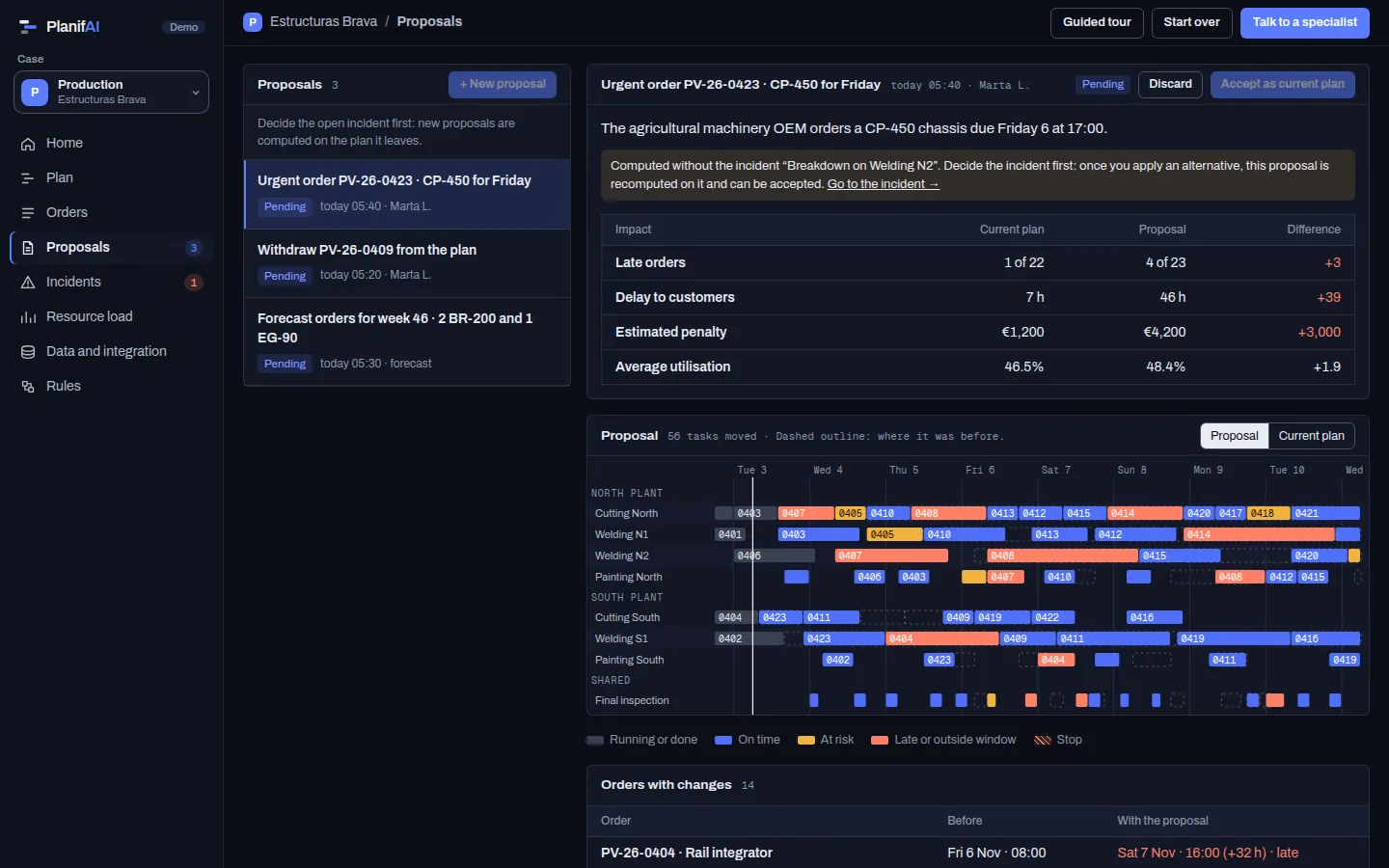
PlanifAI demo: a proposal for three new orders compared with the current plan
Demo screenshot · fictitious company and data

Every stage in its plant, on its machine, on its day

PlanifAI starts from the current plan and decides where and when each stage of the open orders is done. What is already running stays put.

Rules it models

Promised dateBeing late costs, and not every customer weighs the same: a delay to a priority customer costs more than one to a stock order.Soft
Format changesSwitching product, width, recipe or tooling takes time and depends on what ran before: PlanifAI looks for the order that changes least.Soft
Stage orderEach product follows its routing, with its curing, drying or cooling waits between stages.Hard
Finite capacityEach machine, booth or workstation works within its capacity and its calendar.Hard
Material availableNo stage starts before its material arrives.Hard
Same plant per orderAn order’s stages stay in one plant when the process requires it.Hard

Hard: always met. Soft: met as far as possible and, if not, the plan says by how much.

Optimisation

When something changes, it recomputes without scrapping the plan

What it aims for, in order

  1. Meet promised dates, starting with the orders whose delay costs most.
  2. Do not build early without need: making too soon takes up stock and space.
  3. Compact orders: little time between the first and the last stage.
A rush order comes in
PlanifAI computes a proposal: when it would ship, which orders slip and what it costs. If you like it, you accept it; if not, you discard it and nothing changes.
A machine breaks down
What has started stays fixed and you get two or three alternatives with their cost: wait for the repair, add a shift or move orders to another plant.
A supplier is late
The stages waiting for that material move and you see which orders end up late because of it.
The input data changes
Proposals computed on old data are marked as outdated, so nobody accepts a plan that no longer holds.

The whole plan, with what is tight in plain sight

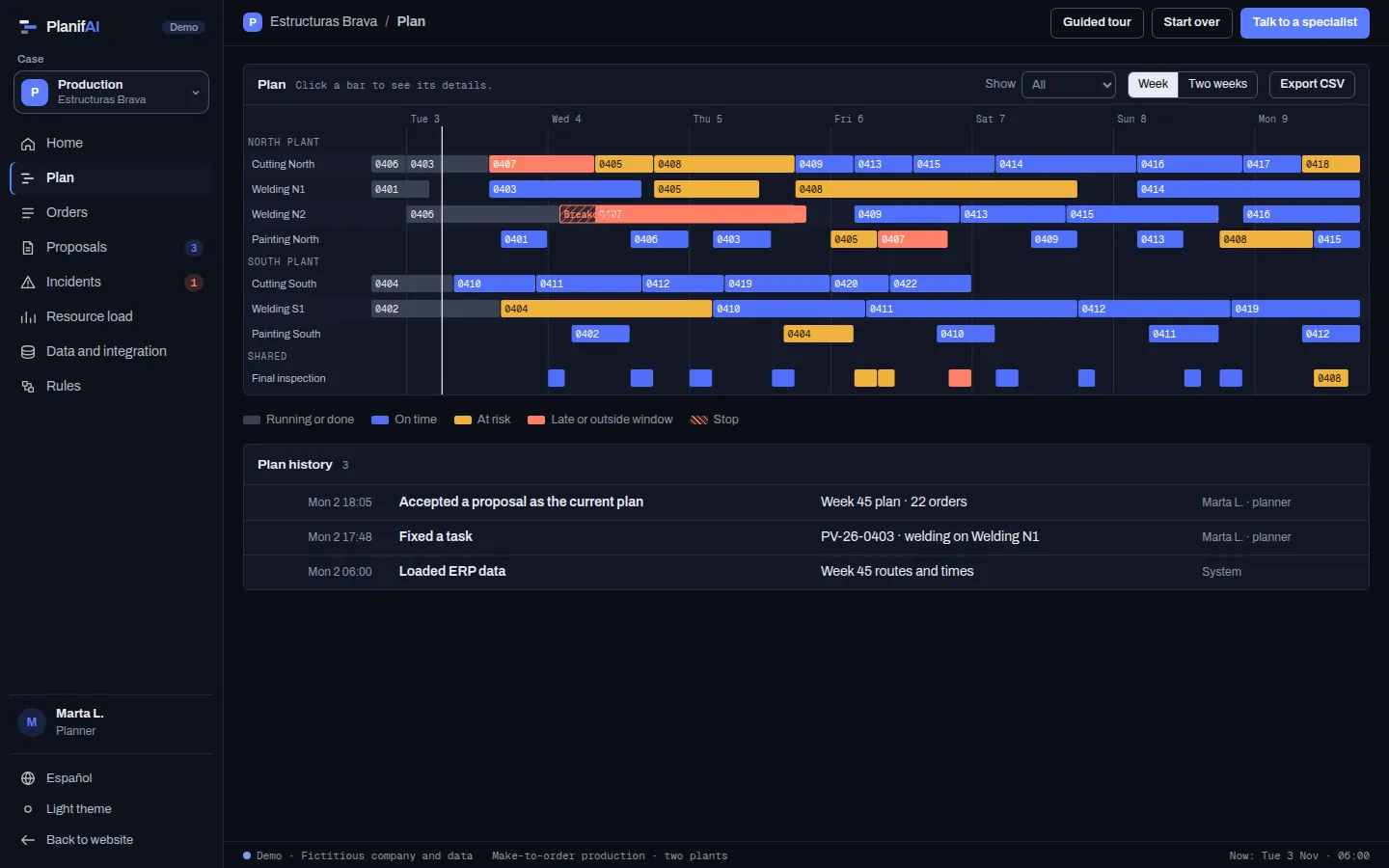
  • The plan per machine in a Gantt chart: running, planned, at risk and late.
  • Each order with its promised date, its expected date and its delay.
  • The load on each plant and machine, with bottlenecks flagged.
  • Each proposal against the current plan: what changes, who ends up late and what it costs.
See it in the demo
PlanifAI demo: production plan per machine across two plants
Demo screenshot · fictitious company and data

Start with what you already have

PlanifAI reads from your ERP (SAP, Oracle, Dynamics or another), your MES or the spreadsheets you already use, and sends the plan back.

To start, it needs

  • Products and routings: stages, possible machines and times.
  • Plants and machines, with their capacity and calendar.
  • Open orders with date, customer and priority.
  • What is already running and the material still to arrive.

Back to your systems

  • Sequence and dates per plant, machine and stage.
  • Expected date of each order.
  • Orders affected by each change.

Questions

My ERP already computes dates. What changes?

Your ERP’s MRP computes requirements assuming infinite capacity. PlanifAI sequences with the real capacity of each machine and your process rules, and lets you compare alternatives before deciding.

Does it work for make-to-stock or batch production?

Yes. It plans make-to-order or make-to-stock, in batches or campaigns, and orders each line by what it costs to switch from one product to another. Each product carries its own routing.

Can I move something by hand?

Yes. You pin the tasks you want and PlanifAI recomputes the rest around them.

What if there is no way to meet every date?

The plan tells you: which orders slip, by how much and because of which machine. You can try alternatives, such as changing priorities or adding a shift.

Bring your open orders. We show you which dates hold.

With a sample of your orders and routings we compute the plan on your machines and tell you which dates you can commit to.